Paper Star Chart or Phone App: Which View Helps You Learn the Sky?
Compare a paper star chart and phone app to choose a view that builds orientation, helps you recognize patterns, and supports a steady observing routine.
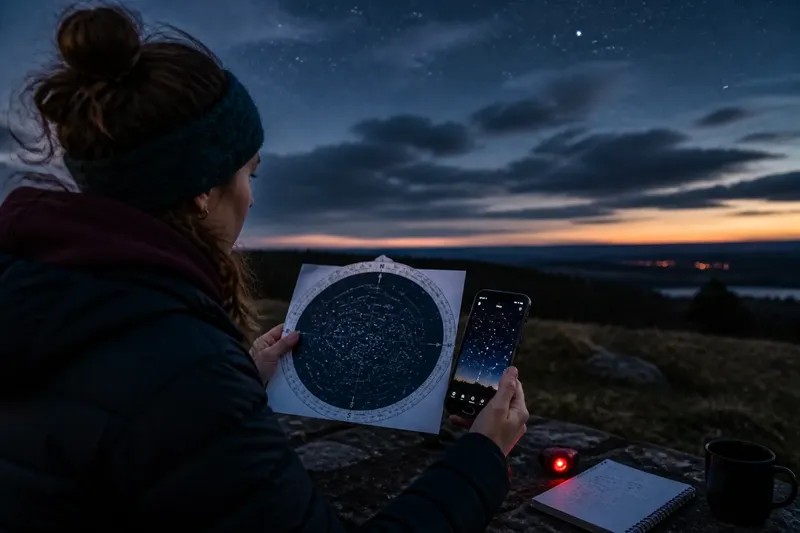
The common mistake with a paper star chart or phone app is trying to match every point of light before you know which way you are facing. That turns a useful observing session into a hunt for labels, and the basic skill—connecting a chart’s directions to the horizon—gets little practice. A paper chart gives you a stable overview; an app can adjust to your location and time. You can learn from either, but each works best at a different moment in a routine.
Start with orientation
Before choosing a tool, identify your horizon and your facing direction. Stand somewhere with a reasonably open view, then find north with a compass or a familiar landmark if you already know the direction. Note where the Sun set, if you saw it. You do not need to identify a constellation yet.
A paper chart shows a broad patch of sky at once, but its page has to be held and turned to match the sky. An app can rotate its display as you turn, if its location and compass settings are working. Neither view replaces the simple act of looking up and checking whether the pattern is in the right part of the sky.
Think of the chart as a paper road map and the app as a map that turns with you. The road map makes the route’s shape easy to see; the turning map can make it easier to tell which way you are facing. For skywatching, that difference matters: one view invites comparison across a region, while the other can help with immediate direction.
Choose a view for tonight
Use a printed chart when you want to see relationships among stars without a screen changing scale or orientation. A rotating planisphere can be set to a date and time, while a seasonal chart gives a less adjustable but useful overview. Check that the chart covers your latitude and the time of year you plan to observe.
Choose an app when you need a display for your current location, date, and time, or when you want to identify a bright object that is hard to place. Set the location manually if needed, and check the time and compass calibration before relying on the direction indicator. If the labels jump as the phone moves, pause the motion display or use the app’s manual sky view.
Screen brightness can make an app awkward outdoors, especially after your eyes have adjusted to darkness. Use a dim or night display if available, and avoid staring at a bright screen between observations. Paper avoids screen glare, though a small flashlight with a red filter may help you read it without flooding the area with white light.
Build a week of practice
A short routine is more useful than flipping between tools each time an unfamiliar star catches your eye. Keep the same observing spot when practical, and choose one recognizable pattern or bright star group to revisit. Clouds may change what you can see; use a clear night for the sky comparison and a cloudy evening to inspect the chart or app indoors.
- First clear evening: Use a paper chart or planisphere to find north, east, south, and west on the page. Turn the chart until its horizon directions match the actual horizon, then look for one large, easy-to-recognize pattern.
- Next observing session: Find that same pattern without opening the app. Say its direction and approximate height above the horizon aloud, then check the chart. The goal is to link a pattern with a place, not memorize every star name.
- Following session: Open an app and set the correct location and time. Point the display toward the pattern you already know. Notice whether the app’s orientation agrees with your view; if it does not, check the compass setting and try a manual view.
- On a later clear evening: Return to the paper chart and trace how the known pattern sits beside neighboring stars. Look for a line, curve, or triangle that helps you recognize the wider region.
- At the end of the week: Put both tools away briefly and find the pattern from memory. Then use whichever tool answers your remaining question: the chart for its neighbors, or the app for its current position and label.
Say you can recognize a bright three-star line but keep mistaking which end points toward a nearby pattern. On the next clear evening, you could hold the chart with its horizon directions aligned, compare the two patterns, and then use the app to confirm their current placement. The expected observable result is a more reliable sense of which pattern lies beside the other, even if you still need the app for its name.
Keep the chart in scale
Charts and apps can differ in orientation, scale, and the number of stars they show. A chart’s horizon view may be reversed or wrapped around the page compared with an ordinary map. Read its legend and direction marks before interpreting a pattern. In an app, zooming changes how much sky fits on screen, so a close view can hide the neighboring stars that make orientation easier.
Use a bright star or simple pattern as an anchor, then compare the nearby shapes rather than matching isolated dots. A printed chart is especially helpful when you want to scan outward from the anchor. An app can help when the chart’s symbols are too dense or you need to check whether an object is above the horizon at your location.
Common tool questions?
Can I learn the sky without an app?
Yes. A planisphere or seasonal chart can show where to look and how star patterns relate, while repeated visits help connect the page to the horizon. Start with a pattern that is easy to recognize and add nearby stars gradually.
Why does my app point the wrong way?
The compass may need calibration, the location may be incorrect, or nearby metal and electronics may interfere with direction sensing. Check the app’s settings, move to a more open spot, and compare its manual sky view with a known horizon direction.
Should I use red light with a paper chart?
A dim red light can make printed symbols easier to read while limiting bright white light, but keep it only as bright as necessary. Some people still find any light distracting, so try reading the chart briefly and then let your eyes settle back into the dark.
Which tool is better for a beginner?
Pick the view that helps you answer the question you have tonight. Use paper to understand a broad pattern and its neighbors; use an app to check a current position or name, then look away from the screen and find the object again.
Keep a small sky log
After each session, jot down the date, your location, the direction you faced, and one pattern you recognized. Add a quick sketch or a note such as “bright line above the western rooftops.” Keep the entry tied to what you actually saw rather than copying a screen full of labels.
After several sessions, compare your notes with the chart or app. If you repeatedly identify the same pattern by its position and shape, your orientation is improving. For the next outing, keep using that anchor and extend your view to one neighboring pattern. A paper star chart or phone app is most useful when it sends your attention back to the sky, where the next recognition becomes your own.